UpchaarNepal Admin Portal
Problem it solves
Central admin dashboard for verifying and managing doctors, patients, clinics, and diagnostics across the UpchaarNepal platform.
Overview
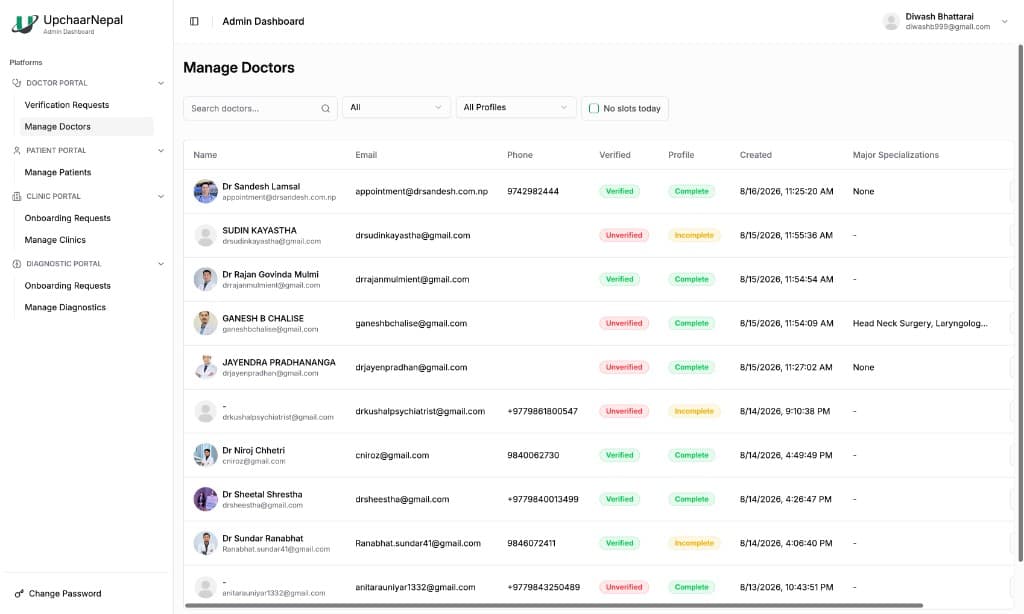
The Admin Portal is the platform control plane for UpchaarNepal. Operators manage verification requests, onboard clinics and diagnostics, and maintain doctor and patient records. Screens like Manage Doctors combine search, profile completeness, verification status, and specialization data so the marketplace stays trustworthy.
I built this as a Full Stack Software Developer at Upachaar Nepal (Jun 2024 - Dec 2025).
Architecture and technical approach
Admin actions gate what appears across patient, doctor, clinic, pharmacy, and diagnostic portals, keeping verification and onboarding consistent platform-wide.
Implementation used React, TypeScript, Tailwind CSS, Redux Toolkit, NestJS, MongoDB, and PostgreSQL. The same names appear on the skills page.
Key features
- Doctor verification requests and manage-doctors workflows
- Patient management across the platform
- Clinic and diagnostic onboarding request queues
- Search and filters for verification and profile status
- Specialization and profile completeness tracking
Technologies used
- •React
- •TypeScript
- •Tailwind CSS
- •Redux Toolkit
- •NestJS
- •MongoDB
- •PostgreSQL
Challenges and solutions
Admin tooling had to stay fast over large healthcare datasets while enforcing verification rules that affect every public portal, which pushed careful filtering, status modeling, and service boundaries.
Screenshots
Admin Manage Doctors view with verification status, profile completeness, and specializations.
Contribution and what I learned
The Admin Portal is where UpchaarNepal’s multi-portal healthcare network is verified, onboarded, and operated.
More product work is on all software projects and the Upachaar Nepal role. Featured work is also previewed on Diwash Bhattarai's homepage.